This guide describes the seven-tab XLSX candidate in kit 1.0.0, using model 1.1.0. The public preview shows actual candidate pages. The paid kit has not been released.
Keep your original and choose a working copy
Use 05-bid-workbook-blank.xlsx for your own estimate. Open 06-bid-workbook-sample-company.xlsx to trace the made-up Cedar Quay example. Save a separate copy before editing. The tabs are Start Here, Inputs, Task Schedule, Cost Model, Sensitivity, Actual vs Estimate and Task Timing.
Enter your own assumptions on Inputs
- Choose Weekly average or Exact month. Weekly average uses visits per week and service weeks per year; Exact month uses a positive whole visit count for the selected month.
- Choose Simple person-hours or Task schedule for cleaning time. Use one method so cleaning is not counted twice.
- Enter other paid time separately, then one labor-cost method: wage plus burden, a complete loaded rate, or the supported itemized labor inputs. A complete loaded rate must not receive burden again.
- Enter direct costs, overhead, contingency and target operating margin. Enter zero for a known absent cost; leave an unknown value blank and resolve it before quoting.
- Choose USD or CAD as a label. The workbook does not convert currencies.
Build and review the task schedule
For included rows, record the task, quantity, timing method, frequency and occurrences. Use observed person-time or a defensible observation for the specific floor task. Keep separately priced work outside the recurring total. Two workers working 1.5 hours each contribute three person-hours; crew size does not multiply those hours again.
Check Cost Model before quoting
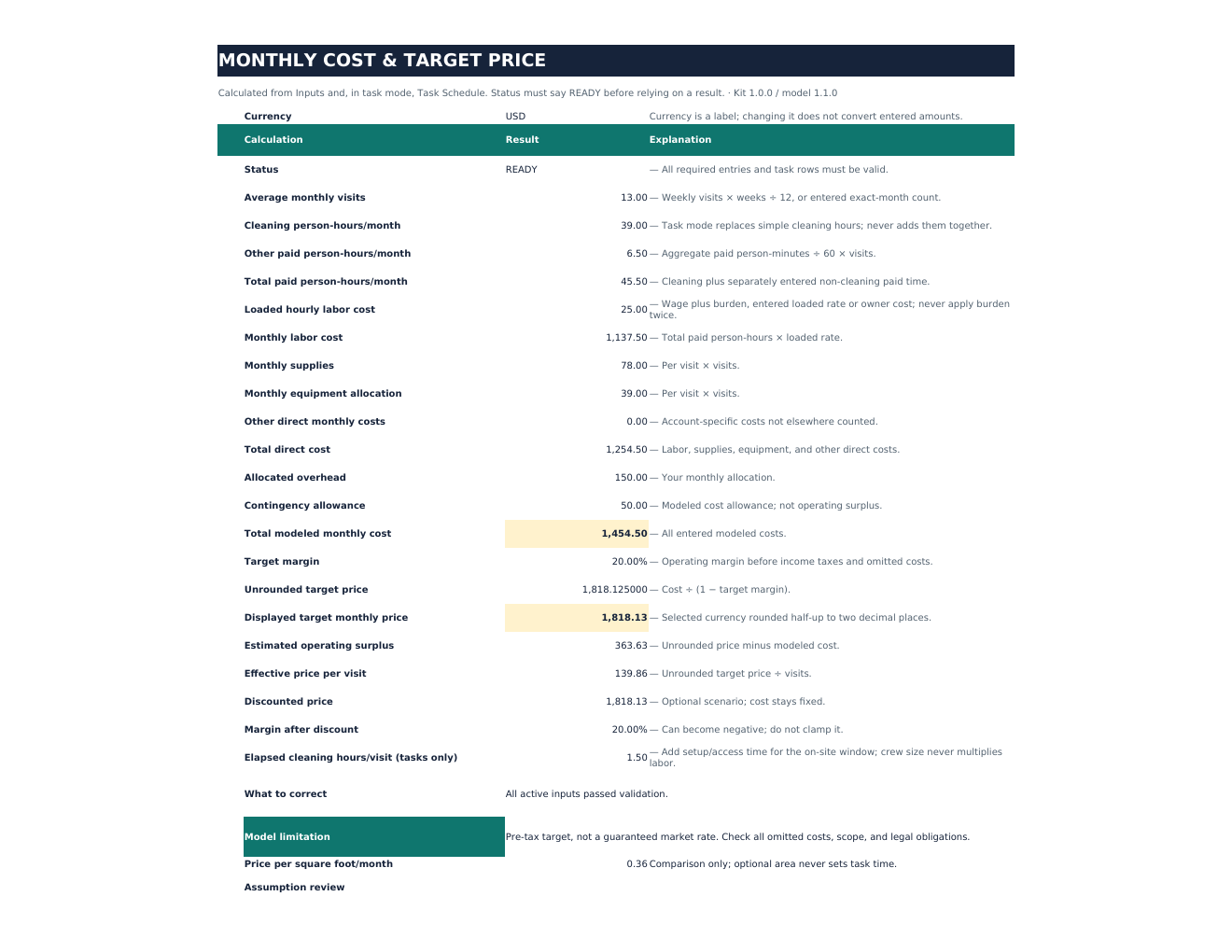
Resolve every missing or inconsistent input until the model says READY. READY checks the entered data; you still need to review the scope and assumptions. The sample has 13 average monthly visits, 45.5 paid person-hours and US$1,454.50 modeled cost. A 20% target operating margin produces US$1,818.125 before rounding, displayed as US$1,818.13.
Present the customer offer
Copy the customer-facing scope, schedule, responsibilities, exclusions and price into 07-proposal-template.docx. Replace every bracketed field and remove instructions before sending it. Keep internal wages, burden, overhead and margin inside the private workbook. Review the final terms for your own business and jurisdiction.
Review the first month
Preserve the accepted estimate. On Actual vs Estimate, enter actual visits, paid person-hours and costs, then explain material differences. Use 09-first-month-review.pdf to record scope changes, access or condition issues, corrective actions and follow-up. Save a revised estimate separately so the original record remains available.
Software, printing and recovery
Use a desktop spreadsheet application for full task tables, validation and print review. The candidate has LibreOffice checks; Microsoft Excel/Word, mobile use and independent buyer compatibility remain under review. Native Google Sheets is a separate copy workflow, described in Sheets help.
Review each print preview for clipped columns and page breaks. For a new bid, copy the blank master again rather than clearing formulas. If a formula is damaged, return to an untouched copy and re-enter the inputs. Report the file, cell, model status, software version and a minimal made-up reproduction to support@mopmargin.com.